 Quizzal
Remember what you read — then unlock the feed.
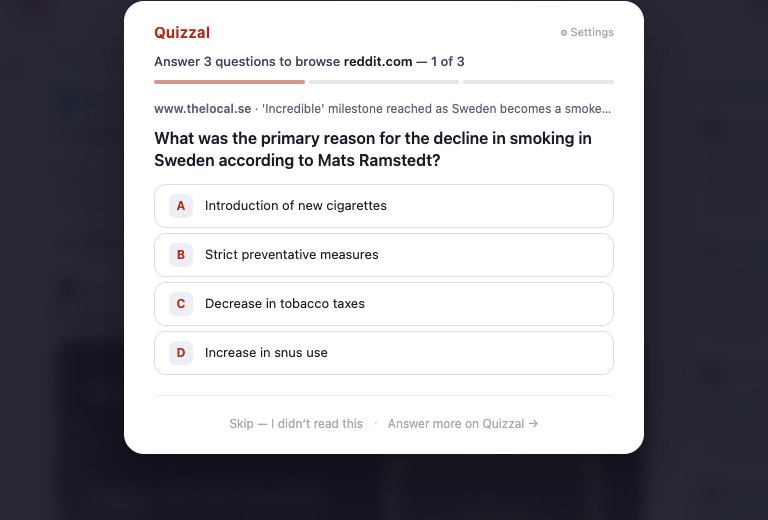
Quizzal turns what you read into quick quiz questions, then parks them in front of your feeds. To open Reddit, X, or YouTube, clear a couple — pulled from things you've actually read.
Free · Already have it? Sign in
Three steps, then it's automatic.
Install the extension
Add Quizzal to Chrome. It runs quietly in the background as you browse — no extra effort.
Read like normal
Articles, blog posts, docs, YouTube. Quizzal turns what you read into quiz questions automatically.
Quiz to scroll
On the feeds you choose, answer one question from something you read before you can scroll.
Put a question between you and the feed.
Switch on Learn First for the sites you tend to scroll mindlessly. Before your next visit each day, Quizzal asks a few quick questions — three by default, and you set how many — pulled from things you've actually read.
One tap to switch on. Clear the questions and the site opens.
Free to start. Pro when it sticks.
For casual readers.
- Auto-generated quizzes from everything you read
- "Learn First" gating on up to 5 sites
- Questions resurface for two weeks
- Daily streak & accuracy stats
or $40/year · for serious learners.
- Everything in Free
- Indefinite spaced repetition — questions resurface for months, so nothing you read fades
- Unlimited "Learn First" sites
- Export to Anki & Notion
- Deeper retention analytics & per-site trends
- Sharper, more insightful questions
Start remembering what you read.
Add Quizzal to Chrome, sign in, and your reading starts working for you. Free to start.